
记录一下:调试了虹软的人脸识别sdk,存到数据库中
生活随笔
收集整理的這篇文章主要介紹了
记录一下:调试了虹软的人脸识别sdk,存到数据库中
小編覺得挺不錯的,現在分享給大家,幫大家做個參考.
虹軟的人臉識別sdk
- 前言
- 一、虹軟是什么?
- 二、使用步驟
- 1.引入庫
- 2.讀入數據
- 總結
- 更新架構
- 更新數據庫(增加圖片存儲)
前言
最近偶爾看到了虹軟sdk開放了活體檢測的功能,以前記得19年的時候就關注過虹軟的人臉識別免費開放的消息。現在正好拿來玩玩。案例僅供參考
一、虹軟是什么?
虹軟是計算機視覺行業領先的算法服務提供商及解決方案供應商,服務于世界各地的客戶,將領先的計算機視覺技術商業化應用在智能手機、智能汽車、智能家居、智能零售、互聯網視頻等領域,并且仍在不斷探索新的領域與方向。
開放了人臉識別,人證核驗和活體檢測的sdk
二、使用步驟
1.引入庫
1.使用C# 作為開發語言,選擇了C++的sdk
去他們官網注冊好賬號后,可以選擇不同的環境以及不同的sdk
2.
準備幾張照片,我準備了三張照片。 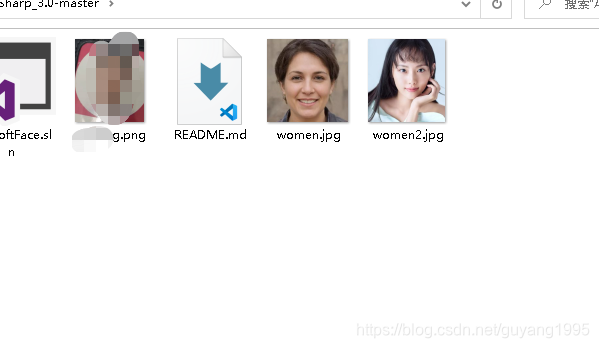 以下是建表語句: 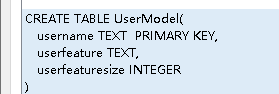 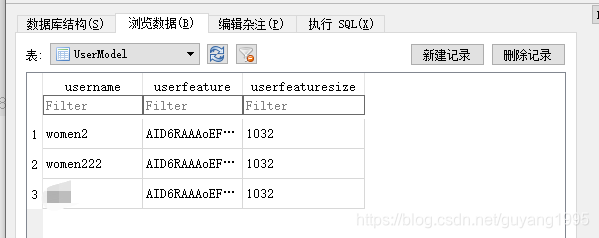username 是人員名字
userfeature 是特征,特征值在虹軟的2.2版本里面使用intptr存儲的,3.0 則使用byte[ ]存儲。3.0會比較方便。直接轉換成basestring 存儲即可。
userfeaturesize 是字符數量
2.讀入數據
在注冊人臉這,添加以下代碼。
在后面,在demo的基礎上添加了后臺按鈕。
//初始化的時候讀取 public bool InitUserFaces(){try{SqlSugarClient db = new SqlSugarClient(new ConnectionConfig(){ConnectionString = ConnectionStringObject.ConnectionString,//連接符字串DbType = DbType.Sqlite,IsAutoCloseConnection = true,InitKeyType = InitKeyType.Attribute//從特性讀取主鍵自增信息});UserFaces = db.Queryable<UserModel>().ToList();db.Close();db.Dispose();return true;}catch (Exception ex){return false;//throw;}}public List<UserModel> UserFaces = new List<UserModel>();try{ 創建數據庫對象SqlSugarClient db = new SqlSugarClient(new ConnectionConfig(){ConnectionString = ConnectionStringObject.ConnectionString,//連接符字串DbType = DbType.Sqlite,IsAutoCloseConnection = true,InitKeyType = InitKeyType.Attribute//從特性讀取主鍵自增信息});var facelist = db.Queryable<UserModel>().ToList();//在點擊開始的時候再坐下初始化檢測,防止程序啟動時有攝像頭,在點擊攝像頭按鈕之前將攝像頭拔掉的情況initVideo();//必須保證有可用攝像頭if (filterInfoCollection.Count == 0){MessageBox.Show("未檢測到攝像頭,請確保已安裝攝像頭或驅動!");return;}if (rgbVideoSource.IsRunning || irVideoSource.IsRunning){btnStartVideo.Text = "啟用攝像頭";//關閉攝像頭if (irVideoSource.IsRunning){irVideoSource.SignalToStop();irVideoSource.Hide();}if (rgbVideoSource.IsRunning){rgbVideoSource.SignalToStop();rgbVideoSource.Hide();}//“選擇識別圖”、“開始匹配”按鈕可用,閾值控件禁用ControlsEnable(true, chooseImgBtn, matchBtn, chooseMultiImgBtn, btnClearFaceList);txtThreshold.Enabled = false;exitVideoRGBFR = true;exitVideoRGBLiveness = true;}else{if (isCompare){//比對結果清除for (int i = 0; i < imagesFeatureList.Count; i++){imageList.Items[i].Text = string.Format("{0}號", i);}lblCompareInfo.Text = string.Empty;isCompare = false;}//“選擇識別圖”、“開始匹配”按鈕禁用,閾值控件可用,顯示攝像頭控件txtThreshold.Enabled = true;rgbVideoSource.Show();irVideoSource.Show();ControlsEnable(false, chooseImgBtn, matchBtn, chooseMultiImgBtn, btnClearFaceList);btnStartVideo.Text = "關閉攝像頭";//獲取filterInfoCollection的總數int maxCameraCount = filterInfoCollection.Count;//如果配置了兩個不同的攝像頭索引if (rgbCameraIndex != irCameraIndex && maxCameraCount >= 2){//RGB攝像頭加載rgbDeviceVideo = new VideoCaptureDevice(filterInfoCollection[rgbCameraIndex < maxCameraCount ? rgbCameraIndex : 0].MonikerString);rgbVideoSource.VideoSource = rgbDeviceVideo;rgbVideoSource.Start();//IR攝像頭irDeviceVideo = new VideoCaptureDevice(filterInfoCollection[irCameraIndex < maxCameraCount ? irCameraIndex : 0].MonikerString);irVideoSource.VideoSource = irDeviceVideo;irVideoSource.Start();//雙攝標志設為trueisDoubleShot = true;}else{//僅打開RGB攝像頭,IR攝像頭控件隱藏rgbDeviceVideo = new VideoCaptureDevice(filterInfoCollection[rgbCameraIndex <= maxCameraCount ? rgbCameraIndex : 0].MonikerString);rgbVideoSource.VideoSource = rgbDeviceVideo;rgbVideoSource.Start();irVideoSource.Hide();}//啟動兩個檢測線程exitVideoRGBFR = false;exitVideoRGBLiveness = false;videoRGBLiveness();//videoRGBFR();videoRGBFRServer();}}catch (Exception ex){LogUtil.LogInfo(GetType(), ex);}private void videoRGBFRServer(){int index = 10000;ThreadPool.QueueUserWorkItem(new WaitCallback(delegate {while (true){//index--;//if (index == 0)//{// index = 10000;// existNewFace = true;//}if (exitVideoRGBFR){return;}try{//if (ableReadFaceInfo && existNewFace && handleQueue.Contains(faceIDTemp) && !livenessResult.Equals(livenessInitValue))if (ableReadFaceInfo && existNewFace && !livenessResult.Equals(livenessInitValue)){ableReadFR = false;if (livenessResult.Equals(1) && rect.left != 0 && rect.right != 0 && rect.top != 0 && rect.bottom != 0){int result = -1;float similarity = 0f;for (int i = 0; i < frMatchTime; i++){if (exitVideoRGBFR){break;}Console.WriteLine(string.Format("faceid:{0},特征搜索第{1}次\r\n", "999", i + 1));Bitmap bitmapTemp = rgbVideoSource.GetCurrentVideoFrame();if (bitmapTemp == null){break;}//提取人臉特征FaceFeature feature = FaceUtil.ExtractFeature(videoRGBImageEngine, bitmapTemp, maxFace);similarity = 0f;result = compareFeatureServer(feature, out similarity);//得到比對結果if (result > -1){break;}}if (!result.Equals(-1)){//將比對結果放到顯示消息中,用于最新顯示trackRGBUnit.message = string.Format(" {0}號 {1},{2},Faceid:{3}", result, similarity, string.Format("RGB{0}", CommonUtil.TransLivenessResult(livenessResult)), UserFaces[result].username);}else{//顯示消息trackRGBUnit.message = string.Format("RGB{0},Faceid:{1}", CommonUtil.TransLivenessResult(livenessResult), result);}}else{//顯示消息trackRGBUnit.message = string.Format("RGB{0},Faceid:{1}", CommonUtil.TransLivenessResult(livenessResult), "999");}}}catch (Exception ex){Console.WriteLine(ex.Message);}finally{ableReadFR = true;}}}));}/// <summary>/// 得到feature比較結果/// </summary>/// <param name="feature"></param>/// <returns></returns>private int compareFeatureServer(FaceFeature feature, out float similarity){int result = -1;similarity = 0f;try{//如果人臉庫不為空,則進行人臉匹配if (UserFaces != null && UserFaces.Count > 0){for (int i = 0; i < UserFaces.Count; i++){//調用人臉匹配方法,進行匹配videoRGBImageEngine.ASFFaceFeatureCompare(feature,new FaceFeature() {feature = Convert.FromBase64String( UserFaces[i].userfeature),featureSize = UserFaces[i].userfeaturesize } , out similarity);if (similarity >= threshold){result = i;break;}}}}catch (Exception ex){LogUtil.LogInfo(GetType(), ex);}return result;}ok 程序到這里就修改完成了。每次程序啟動之后,會從bin文件夾下面的.db文件里面讀取出所有的人臉。然后每次通過攝像頭去匹配。 已測試,效果挺好,識別的很快。就是還有一些小問題。但是總體來說效果很好。
總結
gitee,代碼地址:人臉識別
更新架構
這是官方的樣例demo介紹,本文也是幾乎差不多的原理,目前實現了小型智慧工地的人臉識別系統的設計。
以后有機會的話會更新成下圖右邊的c/s系統設計
更新數據庫(增加圖片存儲)
總共兩張表
總結
以上是生活随笔為你收集整理的记录一下:调试了虹软的人脸识别sdk,存到数据库中的全部內容,希望文章能夠幫你解決所遇到的問題。

- 上一篇: [Leedcode][JAVA][第39
- 下一篇: c语言子查询返回子菜单,T-SQL基础(