
Netty实现简单HTTP代理服务器
自上次使用Openresty+Lua+Nginx的來加速自己的網站,用上了比較時髦的技術,感覺算是讓自己的網站響應速度達到極限了,直到看到了Netty,公司就是打算用Netty來替代Openresty這一套,所以,自己也學了好久,琢磨了好一趟才知道怎么用,現在用來寫一套HTTP代理服務器吧,之后再測試一下性能。
之前相關的文章如下:
【網頁加速】lua redis的二次升級
使用Openresty加快網頁速度
一、Netty中的HTTP
參考自《Netty實戰》
一個完整的HttpRequest請求
FullHttpRequest:
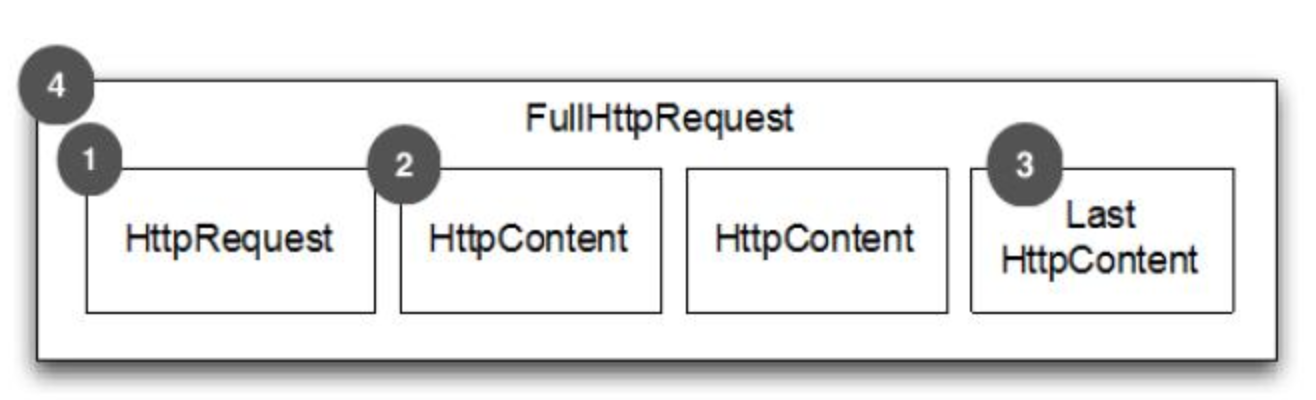
HTTP Request 第一部分是包含的頭信息
HttpContent 里面包含的是數據,可以后續有多個 HttpContent 部分
LastHttpContent 標記是 HTTP request 的結束,同時可能包含頭的尾部信息
完整的 HTTP request
一個完整的HttpResponse請求
FullHttpResponse:
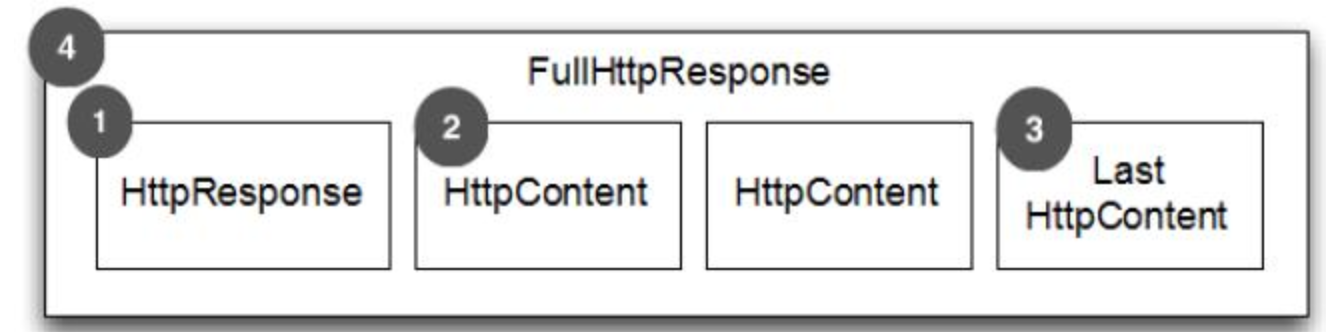
HTTP response 第一部分是包含的頭信息
HttpContent 里面包含的是數據,可以后續有多個 HttpContent 部分
LastHttpContent 標記是 HTTP response 的結束,同時可能包含頭的尾部信息
完整的 HTTP response
二、Netty實現HTTP代理服務器的流程
在實現Http代理服務器之前,我們先來查看一下Netty實現代理服務器的完整流程:
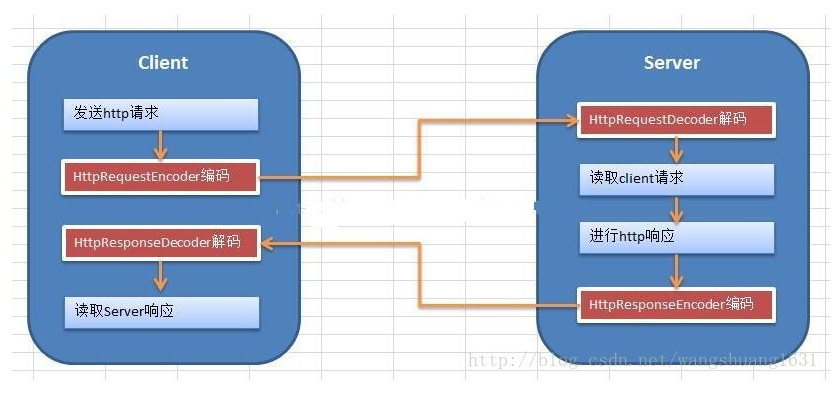
Netty的Http服務的流程是:
1、Client向Server發送http請求,在通常的情況中,client一般指的是瀏覽器,也可以由自己用netty實現一個客戶端。此時,客戶端需要用到HttpRequestEncoder將http請求進行編碼。
2、Server端對http請求進行解析,服務端中,需要用到HttpRequestDecoder來對請求進行解碼,然后實現自己的業務需求。
3、Server端向client發送http響應,處理完業務需求后,將相應的內容,用HttpResponseEncoder進行編碼,返回數據。
4、Client對http響應進行解析,用HttpResponseDecoder進行解碼。
而Netty實現Http代理服務器的過程跟上面的所說無意,只不過是在自己的業務層增加了回源到tomcat服務器這一過程。結合上自己之前實現過的用OpenResty+Nginx來做代理服務器這一套,此處的Netty實現的過程也與此類似。此處粘貼一下OpenResty+Nginx實現的流程圖:
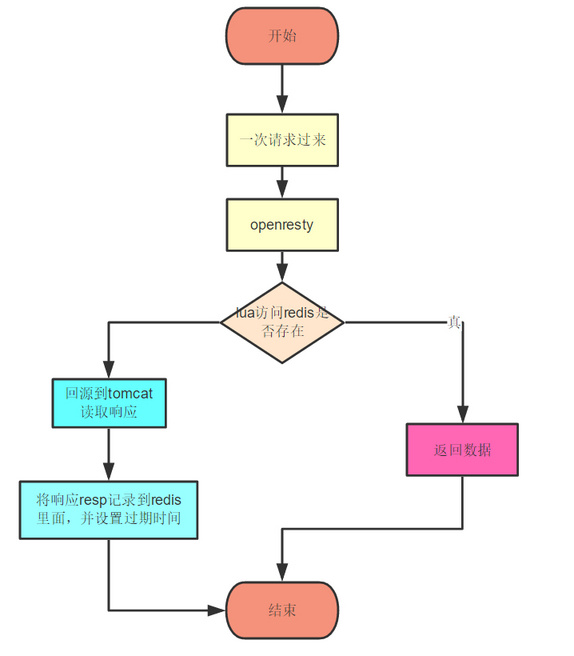
而使用了Netty之后,便是將中間的OpenResty+Nginx換成了Netty,下面我們來看一下具體的實現過程。
三、主要代碼如下:
HttpServer
public class HttpServer {
    public void start(int port) throws Exception {
        EventLoopGroup bossGroup = new NioEventLoopGroup();
        EventLoopGroup workerGroup = new NioEventLoopGroup();
        try {
            ServerBootstrap b = new ServerBootstrap();
            b.group(bossGroup, workerGroup)
                    .handler(new LoggingHandler(LogLevel.DEBUG))
                    .channel(NioServerSocketChannel.class)
                    .childHandler(new ChannelInitializer<SocketChannel>() {
                        @Override
                        public void initChannel(SocketChannel ch)
                                throws Exception {
                            // server端發送的是httpResponse,所以要使用HttpResponseEncoder進行編碼
                            ch.pipeline().addLast(
                                    new HttpResponseEncoder());
                            // server端接收到的是httpRequest,所以要使用HttpRequestDecoder進行解碼
                            ch.pipeline().addLast(
                                    new HttpRequestDecoder());
                            ch.pipeline().addLast(
                                    new HttpServerHandler());
                            //增加自定義實現的Handler
                            ch.pipeline().addLast(new HttpServerCodec());
                        }
                    }).option(ChannelOption.SO_BACKLOG, 128)
                    .childOption(ChannelOption.SO_KEEPALIVE, true);
            ChannelFuture f = b.bind(port).sync();

            f.channel().closeFuture().sync();
        } finally {
            workerGroup.shutdownGracefully();
            bossGroup.shutdownGracefully();
        }
    }

    public static void main(String[] args) throws Exception {
        HttpServer server = new HttpServer();
        server.start(8080);
    }
}
HttpServerHandler
@Slf4j
public class HttpServerHandler extends ChannelInboundHandlerAdapter {

    private RedisUtil redisUtil = new RedisUtil();

    @Override
    public void channelRead(ChannelHandlerContext ctx, Object msg)
            throws Exception {
        if (msg instanceof HttpRequest) {
            DefaultHttpRequest request = (DefaultHttpRequest) msg;
            String uri = request.uri();
            if ("/favicon.ico".equals(uri)) {
                return;
            }
            log.info(new Date().toString());
            Jedis jedis = redisUtil.getJedis();
            String s = jedis.get(uri);
            if (s == null || s.length() == 0) {
                //這里我們的處理是回源到tomcat服務器進行抓取,然后
                //將抓取的內容放回到redis里面
                try {
                    URL url = new URL("http://119.29.188.224:8080" + uri);
                    log.info(url.toString());
                    URLConnection urlConnection = url.openConnection();
                    HttpURLConnection connection = (HttpURLConnection) urlConnection;
                    connection.setRequestMethod("GET");
                    //連接
                    connection.connect();
                    //得到響應碼
                    int responseCode = connection.getResponseCode();
                    if (responseCode == HttpURLConnection.HTTP_OK) {
                        BufferedReader bufferedReader = new BufferedReader(new InputStreamReader
                                (connection.getInputStream(), StandardCharsets.UTF_8));
                        StringBuilder bs = new StringBuilder();
                        String l;
                        while ((l = bufferedReader.readLine()) != null) {
                            bs.append(l).append("
");
                        }
                        s = bs.toString();
                    }
                    jedis.set(uri, s);
                    connection.disconnect();
                } catch (Exception e) {
                    log.error("", e);
                    return;
                }
            }
            jedis.close();
            FullHttpResponse response = new DefaultFullHttpResponse(
                    HTTP_1_1, OK, Unpooled.wrappedBuffer(s != null ? s
                    .getBytes() : new byte[0]));
            response.headers().set(CONTENT_TYPE, "text/html");
            response.headers().set(CONTENT_LENGTH,
                    response.content().readableBytes());
            response.headers().set(CONNECTION, HttpHeaderValues.KEEP_ALIVE);
            ctx.write(response);
            ctx.flush();
        } else {
            //這里必須加拋出異常,要不然ab測試的時候一直卡住不動,暫未解決
            throw new Exception();
        }
    }

    @Override
    public void channelReadComplete(ChannelHandlerContext ctx) throws Exception {
        ctx.flush();
    }

    @Override
    public void exceptionCaught(ChannelHandlerContext ctx, Throwable cause)
            throws Exception {
        ctx.close();
    }
}
四、性能測試
下面的是ab測試,在1GHz、2G內存的centos7機器(阿里云服務器)下進行測試,測試命令ab -c 100 -n 10000 localhost:8000/,并發數為100,總數為10000。
性能:

整體響應時間的分布比(單位:ms):

看完之后,我自己也震驚了,Netty實現的不僅穩定、吞吐率還比OpenResty的高出一倍,OpenResty的居然還有那么多的失敗次數,不知是不是我的代碼的問題還是測試例子不規范,至今,我還是OpenResty的腦殘粉。總體的來說,Netty實現的服務器性能還是比較強的,不僅能夠快速地開發高性能的面向協議的服務器和客戶端,還可以在Netty上輕松實現各種自定義的協議。
五、源碼地址
https://github.com/Zephery/myway
參考:
《Netty實戰》
基于Netty4構建HTTP服務----瀏覽器訪問和Netty客戶端訪問
總結
以上是生活随笔為你收集整理的Netty实现简单HTTP代理服务器的全部內容,希望文章能夠幫你解決所遇到的問題。

- 上一篇: ZigBee基础
- 下一篇: 办公自动化22-一次性将word中的千分