
【错误汇总】PYTHON开发
MySQL相關
1、1153, “Got a packet bigger than ‘max_allowed_packet’ bytes”
set global max_allowed_packet=524288000;2、(1292, “Truncated incorrect DOUBLE value: ‘2020-02’”)
python通過MySQLdb執行sql語句時,如果查詢條件內有時間類型的例如:currentdate={obj.currentdate}需要改成currentdate='{obj.currentdate}' # 在花括號外側增加單引號Python相關
1、 error in anyjson setup command: use_2to3 is invalid.
pip install setuptools==57.5.02、 ImportError: cannot import name ‘render_to_response’
修改報錯文件的引入:*\site-packages\djcelery\admin.pyfrom django.shortcuts import render_to_response替換為from django.shortcuts import render3、 ModuleNotFoundError: No module named ‘django.core.management.validation’
pip install setuptools==57.5.04、 關于OSError: [WinError 123] 文件名、目錄名或卷標語法不正確。: ‘<frozen importlib._bootstrap>‘解決方法
查看settings內的apps里是否有不存在或者已刪除或存在報錯的內容5、django.core.exceptions.ImproperlyConfigured: The included URLconf ‘<module ‘apps.expense_cdn’ from ‘E:\expense_system\apps\expense_cdn\init.py’>’ does not appear to have any patterns in it. If you see valid patterns in the file then the issue is probably caused by a circular import.
views.py文件中沒有patterns進行匹配,導致找不到路徑 查看項目下的urls.py文件中路徑指向,include()路徑是指向了視圖函數文件,導致無法匹配有些錯誤是因為創建的應用中缺少urlpatterns也會報同樣的錯誤。將之前指向views文件的指向urls即解決了問題6、python manage.py makemigrations,執行不生成遷移文件
1、查看settings INSTALLED_APPS是否添加,或者添加至 ***.apps.***Config2、如果是多個app,并且單獨app內新建了models文件夾,在models文件夾內__init__內from .你的models文件名稱 import *3、基本即可解決7、django在上傳文件過程中的報錯
報錯如下:[uwsgi-body-read] Timeout reading 45256 bytes. Content-Length: 2043522 consulOSError: timeout during read(65536) on wsgi.inputdjango.http.request.UnreadablePostError: timeout during read(65536) on wsgi.input解決方式:1、首先查看nginx的緩沖區的設置2、查看uwsgi的最大允許上傳文件的大小設置3、如果都設置正確,name優先選擇重啟nginx,一般可以解決,不行在重啟項目以上是我遇到時候的解決辦法Centos 7.9相關
1、可視化界面分辨率
命令行輸入: xrandr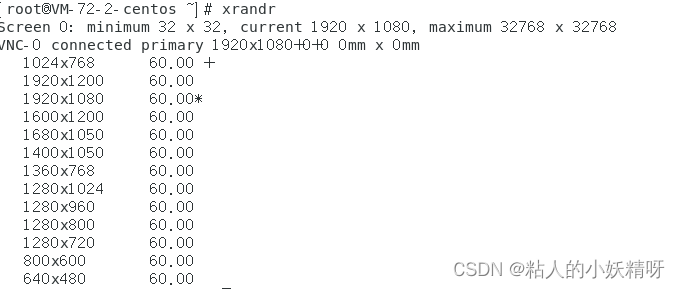命令行輸入: xrandr -s 0 此處0為上述分辨率的第一個,以此類推即可2、網絡設備啟用
網絡提示 未啟用 NetworkManager 先執行 chkconfig NetworkManager on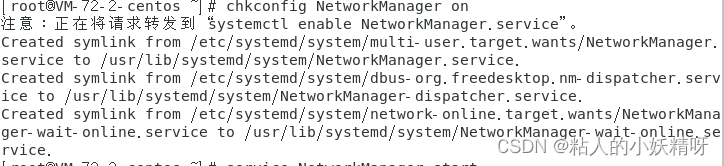再執行 service NetworkManager startOracle相關
1、python和Oracle,中文問號的問題
import os os.environ['NLS_LANG'] = 'SIMPLIFIED CHINESE_CHINA.UTF8'Vue相關
1、 options has an unknown property ‘hotOnly’. These properties are valid:
object { allowedHosts?, bonjour?, client?, compress?, devMiddleware?,…
2、vue 報錯
Error: Rule can only have one resource source (provided resource and test + include + exclude) in"exclude": [null],"use": [{"loader": "/Users/juanpablo/front-treatments/node_modules/cache-loader/dist/cjs.js","options": {"cacheDirectory": "/Users/juanpablo/front-treatments/node_modules/.cache/babel-loader","cacheIdentifier": "81fef5a6"},"ident": "clonedRuleSet-38[0].rules[0].use[0]"},{"loader": "/Users/juanpablo/front-treatments/node_modules/babel-loader/lib/index.js","options": "undefined","ident": "undefined"}] } 解決方法刪除webpack,重新裝以前的版本。npm uninstall webpacknpm install webpack@^4.0.0 --save-dev3、VUE警告錯誤:
[Vue warn]: Avoid mutating a prop directly since the value will be overwritten whenever the parent component re-renders. Instead, use a data or computed property based on the prop’s value. Prop being mutated: “placement”
4、VUE請求后,收到404、403等錯誤的結果,通過Axios請求后,無法獲取res,不能進行跳轉。示例代碼如下
自己封裝的一個axios請求request("xxxxxxxx", "get", json).then((res) => {if (res.code === "0"){xxxxxxxxxxxxxxx}})由于接口請求錯誤是403,代碼邏輯始終進入不到if判斷里,then方法也沒有進入,代碼不能執行,后來發現需要在then的同級,添加catch來進行錯誤監聽,才能捕捉接口錯誤并進行邏輯判斷。request("xxxxxxxx", "get", json).then((res) => {if (res.code === "0"){xxxxxxxxxxxxxxx}})catch (error) {xxxxxxxxx -----在這里進行邏輯處理,例如403的話,可以進行頁面跳轉等等}由于個人對vue不熟悉,這個錯誤困擾了半天時間,記錄下來。改天系統學習下,再來修改!5、ELEMENT UI上傳組件不執行 on-success鉤子的問題
<el-uploadclass="upload-demo"dragaction="https://jsonplaceholder.typicode.com/posts/"~~:file-list="fileList"~~ :on-remove="handleRemove" :on-change="onchange" :on-success="onSuccess" multiple><i class="el-icon-upload"></i><div class="el-upload__text">將文件拖到此處,或<em>點擊上傳</em></div><div class="el-upload__tip" slot="tip">只能上傳jpg/png文件,且不超過500kb</div></el-upload>如果你的上傳需要調用on-success,但是寫入了并不生生效,請刪除代碼里的 :file-list="fileList"具體原因沒深入查找,先解決項目問題,后續研究總結
以上是生活随笔為你收集整理的【错误汇总】PYTHON开发的全部內容,希望文章能夠幫你解決所遇到的問題。

- 上一篇: 几款杀毒软件下载和升级
- 下一篇: [Python从零到壹] 三十四.Ope