
史上最详细的XGBoost实战
0. 環(huán)境介紹
Python 版 本: 3.6.2
操作系統(tǒng) : Windows
集成開發(fā)環(huán)境: PyCharm
1. 安裝Python環(huán)境
安裝Python
首先,我們需要安裝Python環(huán)境。本人選擇的是64位版本的Python 3.6.2。去Python官網(wǎng)https://www.python.org/選擇相應(yīng)的版本并下載。如下如所示:

接下來安裝,并最終選擇將Python加入環(huán)境變量中。
安裝依賴包
去網(wǎng)址:http://www.lfd.uci.edu/~gohlke/pythonlibs/中去下載你所需要的如下Python安裝包:
?numpy-1.13.1+mkl-cp36-cp36m-win_amd64.whl
?scipy-0.19.1-cp36-cp36m-win_amd64.whl
?xgboost-0.6-cp36-cp36m-win_amd64.whl
1
2
3
假設(shè)上述三個包所在的目錄為D:\Application,則運行Windows 命令行運行程序cmd,并將當(dāng)前目錄轉(zhuǎn)到這兩個文件所在的目錄下。并依次執(zhí)行如下操作安裝這兩個包:
>> pip install numpy-1.13.1+mkl-cp36-cp36m-win_amd64.whl
>> pip install scipy-0.19.1-cp36-cp36m-win_amd64.whl
>> pip install xgboost-0.6-cp36-cp36m-win_amd64.whl
1
2
3
安裝Scikit-learn
眾所周知,scikit-learn是Python機(jī)器學(xué)習(xí)最著名的開源庫之一。因此,我們需要安裝此庫。執(zhí)行如下命令安裝scikit-learn機(jī)器學(xué)習(xí)庫:
>> pip install -U scikit-learn
1
測試安裝是否成功
>>> from sklearn import svm
>>> X = [[0, 0], [1, 1]]
>>> y = [0, 1]
>>> clf = svm.SVC()
>>> clf.fit(X, y) ?
>>> clf.predict([[2., 2.]])
array([1])
>>> import xgboost as xgb
1
2
3
4
5
6
7
8
注意:如果如上所述正確輸出,則表示安裝完成。否則就需要檢查安裝步驟是否出錯,或者系統(tǒng)是否缺少必要的Windows依賴庫。常用的一般情況會出現(xiàn)缺少VC++運行庫,在Windows 7、8、10等版本中安裝Visual C++ 2015基本上就能解決問題。
安裝PyCharm
對于PyChram的下載,請點擊PyCharm官網(wǎng)去下載,當(dāng)然windows下軟件的安裝不用解釋,傻瓜式的點擊 下一步 就行了。

注意:PyCharm軟件是基于Java開發(fā)的,所以安裝該集成開發(fā)環(huán)境前請先安裝JDK,建議安裝JDK1.8。
經(jīng)過上述步驟,基本上軟件環(huán)境的問題全部解決了,接下來就是實際的XGBoost庫實戰(zhàn)了……
2. XGBoost的優(yōu)點
2.1 正則化
XGBoost在代價函數(shù)里加入了正則項,用于控制模型的復(fù)雜度。正則項里包含了樹的葉子節(jié)點個數(shù)、每個葉子節(jié)點上輸出的score的L2模的平方和。從Bias-variance tradeoff角度來講,正則項降低了模型的variance,使學(xué)習(xí)出來的模型更加簡單,防止過擬合,這也是xgboost優(yōu)于傳統(tǒng)GBDT的一個特性。
2.2 并行處理
XGBoost工具支持并行。Boosting不是一種串行的結(jié)構(gòu)嗎?怎么并行的?注意XGBoost的并行不是tree粒度的并行,XGBoost也是一次迭代完才能進(jìn)行下一次迭代的(第t次迭代的代價函數(shù)里包含了前面t-1次迭代的預(yù)測值)。XGBoost的并行是在特征粒度上的。
我們知道,決策樹的學(xué)習(xí)最耗時的一個步驟就是對特征的值進(jìn)行排序(因為要確定最佳分割點),XGBoost在訓(xùn)練之前,預(yù)先對數(shù)據(jù)進(jìn)行了排序,然后保存為block結(jié)構(gòu),后面的迭代中重復(fù)地使用這個結(jié)構(gòu),大大減小計算量。這個block結(jié)構(gòu)也使得并行成為了可能,在進(jìn)行節(jié)點的分裂時,需要計算每個特征的增益,最終選增益最大的那個特征去做分裂,那么各個特征的增益計算就可以開多線程進(jìn)行。
2.3 靈活性
XGBoost支持用戶自定義目標(biāo)函數(shù)和評估函數(shù),只要目標(biāo)函數(shù)二階可導(dǎo)就行。
2.4 缺失值處理
對于特征的值有缺失的樣本,xgboost可以自動學(xué)習(xí)出它的分裂方向
2.5 剪枝
XGBoost 先從頂?shù)降捉⑺锌梢越⒌淖訕?#xff0c;再從底到頂反向進(jìn)行剪枝。比起GBM,這樣不容易陷入局部最優(yōu)解。
2.6 內(nèi)置交叉驗證
XGBoost允許在每一輪boosting迭代中使用交叉驗證。因此,可以方便地獲得最優(yōu)boosting迭代次數(shù)。而GBM使用網(wǎng)格搜索,只能檢測有限個值。
3. XGBoost詳解
3.1 數(shù)據(jù)格式
XGBoost可以加載多種數(shù)據(jù)格式的訓(xùn)練數(shù)據(jù):
libsvm 格式的文本數(shù)據(jù);
Numpy 的二維數(shù)組;
XGBoost 的二進(jìn)制的緩存文件。加載的數(shù)據(jù)存儲在對象 **DMatrix **中。
下面一一列舉:
加載libsvm格式的數(shù)據(jù)
>>> dtrain1 = xgb.DMatrix('train.svm.txt')
1
加載二進(jìn)制的緩存文件
>>> dtrain2 = xgb.DMatrix('train.svm.buffer')
1
加載numpy的數(shù)組
>>> data = np.random.rand(5,10) # 5 entities, each contains 10 features
>>> label = np.random.randint(2, size=5) # binary target
>>> dtrain = xgb.DMatrix( data, label=label)
1
2
3
將scipy.sparse格式的數(shù)據(jù)轉(zhuǎn)化為 DMatrix 格式
>>> csr = scipy.sparse.csr_matrix( (dat, (row,col)) )
>>> dtrain = xgb.DMatrix( csr )
1
2
將 DMatrix 格式的數(shù)據(jù)保存成XGBoost的二進(jìn)制格式,在下次加載時可以提高加載速度,使用方式如下
>>> dtrain = xgb.DMatrix('train.svm.txt')
>>> dtrain.save_binary("train.buffer")
1
2
可以用如下方式處理 DMatrix中的缺失值:
>>> dtrain = xgb.DMatrix( data, label=label, missing = -999.0)
1
當(dāng)需要給樣本設(shè)置權(quán)重時,可以用如下方式
>>> w = np.random.rand(5,1)
>>> dtrain = xgb.DMatrix( data, label=label, missing = -999.0, weight=w)
1
2
3.2 參數(shù)設(shè)置
XGBoost使用key-value字典的方式存儲參數(shù):
params = {
? ? 'booster': 'gbtree',
? ? 'objective': 'multi:softmax', ?# 多分類的問題
? ? 'num_class': 10, ? ? ? ? ? ? ? # 類別數(shù),與 multisoftmax 并用
? ? 'gamma': 0.1, ? ? ? ? ? ? ? ? ?# 用于控制是否后剪枝的參數(shù),越大越保守,一般0.1、0.2這樣子。
? ? 'max_depth': 12, ? ? ? ? ? ? ? # 構(gòu)建樹的深度,越大越容易過擬合
? ? 'lambda': 2, ? ? ? ? ? ? ? ? ? # 控制模型復(fù)雜度的權(quán)重值的L2正則化項參數(shù),參數(shù)越大,模型越不容易過擬合。
? ? 'subsample': 0.7, ? ? ? ? ? ? ?# 隨機(jī)采樣訓(xùn)練樣本
? ? 'colsample_bytree': 0.7, ? ? ? # 生成樹時進(jìn)行的列采樣
? ? 'min_child_weight': 3,
? ? 'silent': 1, ? ? ? ? ? ? ? ? ? # 設(shè)置成1則沒有運行信息輸出,最好是設(shè)置為0.
? ? 'eta': 0.007, ? ? ? ? ? ? ? ? ?# 如同學(xué)習(xí)率
? ? 'seed': 1000,
? ? 'nthread': 4, ? ? ? ? ? ? ? ? ?# cpu 線程數(shù)
}
1
2
3
4
5
6
7
8
9
10
11
12
13
14
15
3.3 訓(xùn)練模型
有了參數(shù)列表和數(shù)據(jù)就可以訓(xùn)練模型了
num_round = 10
bst = xgb.train( plst, dtrain, num_round, evallist )
1
2
3.4 模型預(yù)測
# X_test類型可以是二維List,也可以是numpy的數(shù)組
dtest = DMatrix(X_test)
ans = model.predict(dtest)
1
2
3
3.5 保存模型
在訓(xùn)練完成之后可以將模型保存下來,也可以查看模型內(nèi)部的結(jié)構(gòu)
? ? bst.save_model('test.model')
1
導(dǎo)出模型和特征映射(Map)
你可以導(dǎo)出模型到txt文件并瀏覽模型的含義:
# dump model
bst.dump_model('dump.raw.txt')
# dump model with feature map
bst.dump_model('dump.raw.txt','featmap.txt')
1
2
3
4
3.6 加載模型
通過如下方式可以加載模型:
bst = xgb.Booster({'nthread':4}) # init model
bst.load_model("model.bin") ? ? ?# load data
1
2
4. XGBoost參數(shù)詳解
在運行XGboost之前,必須設(shè)置三種類型成熟:general parameters,booster parameters和task parameters:
General parameters
該參數(shù)參數(shù)控制在提升(boosting)過程中使用哪種booster,常用的booster有樹模型(tree)和線性模型(linear model)。
Booster parameters
這取決于使用哪種booster。
Task parameters
控制學(xué)習(xí)的場景,例如在回歸問題中會使用不同的參數(shù)控制排序。
4.1 General Parameters
booster [default=gbtree]
有兩中模型可以選擇gbtree和gblinear。gbtree使用基于樹的模型進(jìn)行提升計算,gblinear使用線性模型進(jìn)行提升計算。缺省值為gbtree
silent [default=0]
取0時表示打印出運行時信息,取1時表示以緘默方式運行,不打印運行時信息。缺省值為0
**nthread **
XGBoost運行時的線程數(shù)。缺省值是當(dāng)前系統(tǒng)可以獲得的最大線程數(shù)
num_pbuffer
預(yù)測緩沖區(qū)大小,通常設(shè)置為訓(xùn)練實例的數(shù)目。緩沖用于保存最后一步提升的預(yù)測結(jié)果,無需人為設(shè)置。
**num_feature **
Boosting過程中用到的特征維數(shù),設(shè)置為特征個數(shù)。XGBoost會自動設(shè)置,無需人為設(shè)置。
4.2 Parameters for Tree Booster
eta [default=0.3]
為了防止過擬合,更新過程中用到的收縮步長。在每次提升計算之后,算法會直接獲得新特征的權(quán)重。 eta通過縮減特征的權(quán)重使提升計算過程更加保守。缺省值為0.3
取值范圍為:[0,1]
gamma [default=0]
minimum loss reduction required to make a further partition on a leaf node of the tree. the larger, the more conservative the algorithm will be.
取值范圍為:[0,∞]
max_depth [default=6]
數(shù)的最大深度。缺省值為6
取值范圍為:[1,∞]
min_child_weight [default=1]
孩子節(jié)點中最小的樣本權(quán)重和。如果一個葉子節(jié)點的樣本權(quán)重和小于min_child_weight則拆分過程結(jié)束。在現(xiàn)行回歸模型中,這個參數(shù)是指建立每個模型所需要的最小樣本數(shù)。該成熟越大算法越conservative
取值范圍為:[0,∞]
max_delta_step [default=0]
我們允許每個樹的權(quán)重被估計的值。如果它的值被設(shè)置為0,意味著沒有約束;如果它被設(shè)置為一個正值,它能夠使得更新的步驟更加保守。通常這個參數(shù)是沒有必要的,但是如果在邏輯回歸中類極其不平衡這時候他有可能會起到幫助作用。把它范圍設(shè)置為1-10之間也許能控制更新。
取值范圍為:[0,∞]
subsample [default=1]
用于訓(xùn)練模型的子樣本占整個樣本集合的比例。如果設(shè)置為0.5則意味著XGBoost將隨機(jī)的從整個樣本集合中隨機(jī)的抽取出50%的子樣本建立樹模型,這能夠防止過擬合。
取值范圍為:(0,1]
colsample_bytree [default=1]
在建立樹時對特征采樣的比例。缺省值為1
取值范圍為:(0,1]
4.3 Parameter for Linear Booster
lambda [default=0]
L2 正則的懲罰系數(shù)
alpha [default=0]
L1 正則的懲罰系數(shù)
lambda_bias
在偏置上的L2正則。缺省值為0(在L1上沒有偏置項的正則,因為L1時偏置不重要)
4.4 Task Parameters
objective [ default=reg:linear ]
定義學(xué)習(xí)任務(wù)及相應(yīng)的學(xué)習(xí)目標(biāo),可選的目標(biāo)函數(shù)如下:
“reg:linear” —— 線性回歸。
“reg:logistic”—— 邏輯回歸。
“binary:logistic”—— 二分類的邏輯回歸問題,輸出為概率。
“binary:logitraw”—— 二分類的邏輯回歸問題,輸出的結(jié)果為wTx。
“count:poisson”—— 計數(shù)問題的poisson回歸,輸出結(jié)果為poisson分布。在poisson回歸中,max_delta_step的缺省值為0.7。(used to safeguard optimization)
“multi:softmax” –讓XGBoost采用softmax目標(biāo)函數(shù)處理多分類問題,同時需要設(shè)置參數(shù)num_class(類別個數(shù))
“multi:softprob” –和softmax一樣,但是輸出的是ndata * nclass的向量,可以將該向量reshape成ndata行nclass列的矩陣。沒行數(shù)據(jù)表示樣本所屬于每個類別的概率。
“rank:pairwise” –set XGBoost to do ranking task by minimizing the pairwise loss
base_score [ default=0.5 ]
所有實例的初始化預(yù)測分?jǐn)?shù),全局偏置;
為了足夠的迭代次數(shù),改變這個值將不會有太大的影響。
eval_metric [ default according to objective ]
校驗數(shù)據(jù)所需要的評價指標(biāo),不同的目標(biāo)函數(shù)將會有缺省的評價指標(biāo)(rmse for regression, and error for classification, mean average precision for ranking)-
用戶可以添加多種評價指標(biāo),對于Python用戶要以list傳遞參數(shù)對給程序,而不是map參數(shù)list參數(shù)不會覆蓋’eval_metric’
可供的選擇如下:
“rmse”: root mean square error
“l(fā)ogloss”: negative log-likelihood
“error”: Binary classification error rate. It is calculated as #(wrong cases)/#(all cases). For the predictions, the evaluation will regard the instances with prediction value larger than 0.5 as positive instances, and the others as negative instances.
“merror”: Multiclass classification error rate. It is calculated as #(wrongcases)#(allcases)\frac{\#(wrong \quad cases)}{\#(all \quad cases)}?
#(allcases)
#(wrongcases)
??? ?
?.
“mlogloss”: Multiclass logloss
“auc”: Area under the curve for ranking evaluation.
“ndcg”:Normalized Discounted Cumulative Gain
“map”:Mean average precision
“ndcg@n”,”map@n”: n can be assigned as an integer to cut off the top positions in the lists for evaluation.
“ndcg-“,”map-“,”ndcg@n-“,”map@n-“: In XGBoost, NDCG and MAP will evaluate the score of a list without any positive samples as 1. By adding “-” in the evaluation metric XGBoost will evaluate these score as 0 to be consistent under some conditions. training repeatively
seed [ default=0 ]
隨機(jī)數(shù)的種子。缺省值為0
5. XGBoost實戰(zhàn)
XGBoost有兩大類接口:XGBoost原生接口 和 scikit-learn接口 ,并且XGBoost能夠?qū)崿F(xiàn) 分類 和 回歸 兩種任務(wù)。因此,本章節(jié)分四個小塊來介紹!
5.1 基于XGBoost原生接口的分類
from sklearn.datasets import load_iris
import xgboost as xgb
from xgboost import plot_importance
from matplotlib import pyplot as plt
from sklearn.model_selection import train_test_split
# read in the iris data
iris = load_iris()
X = iris.data
y = iris.target
X_train, X_test, y_train, y_test = train_test_split(X, y, test_size=0.2, random_state=1234565)
params = {
? ? 'booster': 'gbtree',
? ? 'objective': 'multi:softmax',
? ? 'num_class': 3,
? ? 'gamma': 0.1,
? ? 'max_depth': 6,
? ? 'lambda': 2,
? ? 'subsample': 0.7,
? ? 'colsample_bytree': 0.7,
? ? 'min_child_weight': 3,
? ? 'silent': 1,
? ? 'eta': 0.1,
? ? 'seed': 1000,
? ? 'nthread': 4,
}
plst = params.items()
dtrain = xgb.DMatrix(X_train, y_train)
num_rounds = 500
model = xgb.train(plst, dtrain, num_rounds)
# 對測試集進(jìn)行預(yù)測
dtest = xgb.DMatrix(X_test)
ans = model.predict(dtest)
# 計算準(zhǔn)確率
cnt1 = 0
cnt2 = 0
for i in range(len(y_test)):
? ? if ans[i] == y_test[i]:
? ? ? ? cnt1 += 1
? ? else:
? ? ? ? cnt2 += 1
print("Accuracy: %.2f %% " % (100 * cnt1 / (cnt1 + cnt2)))
# 顯示重要特征
plot_importance(model)
plt.show()
1
2
3
4
5
6
7
8
9
10
11
12
13
14
15
16
17
18
19
20
21
22
23
24
25
26
27
28
29
30
31
32
33
34
35
36
37
38
39
40
41
42
43
44
45
46
47
48
49
50
51
52
53
54
55
56
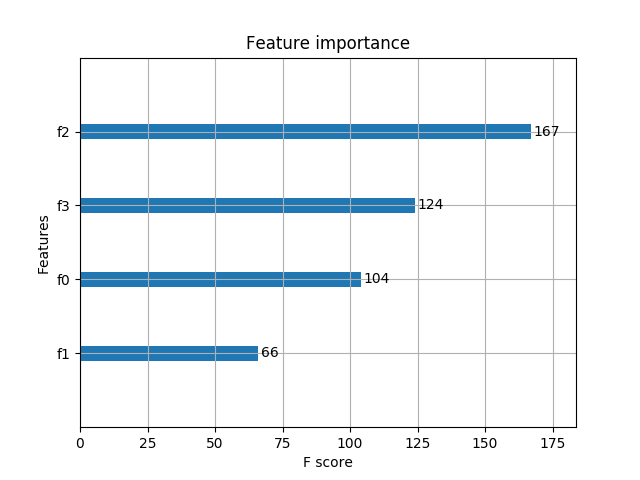
輸出預(yù)測正確率以及特征重要性:
Accuracy: 96.67 %?
1
5.2 基于XGBoost原生接口的回歸
import xgboost as xgb
from xgboost import plot_importance
from matplotlib import pyplot as plt
from sklearn.model_selection import train_test_split
# 讀取文件原始數(shù)據(jù)
data = []
labels = []
labels2 = []
with open("lppz5.csv", encoding='UTF-8') as fileObject:
? ? for line in fileObject:
? ? ? ? line_split = line.split(',')
? ? ? ? data.append(line_split[10:])
? ? ? ? labels.append(line_split[8])
X = []
for row in data:
? ? row = [float(x) for x in row]
? ? X.append(row)
y = [float(x) for x in labels]
# XGBoost訓(xùn)練過程
X_train, X_test, y_train, y_test = train_test_split(X, y, test_size=0.2, random_state=0)
params = {
? ? 'booster': 'gbtree',
? ? 'objective': 'reg:gamma',
? ? 'gamma': 0.1,
? ? 'max_depth': 5,
? ? 'lambda': 3,
? ? 'subsample': 0.7,
? ? 'colsample_bytree': 0.7,
? ? 'min_child_weight': 3,
? ? 'silent': 1,
? ? 'eta': 0.1,
? ? 'seed': 1000,
? ? 'nthread': 4,
}
dtrain = xgb.DMatrix(X_train, y_train)
num_rounds = 300
plst = params.items()
model = xgb.train(plst, dtrain, num_rounds)
# 對測試集進(jìn)行預(yù)測
dtest = xgb.DMatrix(X_test)
ans = model.predict(dtest)
# 顯示重要特征
plot_importance(model)
plt.show()
1
2
3
4
5
6
7
8
9
10
11
12
13
14
15
16
17
18
19
20
21
22
23
24
25
26
27
28
29
30
31
32
33
34
35
36
37
38
39
40
41
42
43
44
45
46
47
48
49
50
51
52
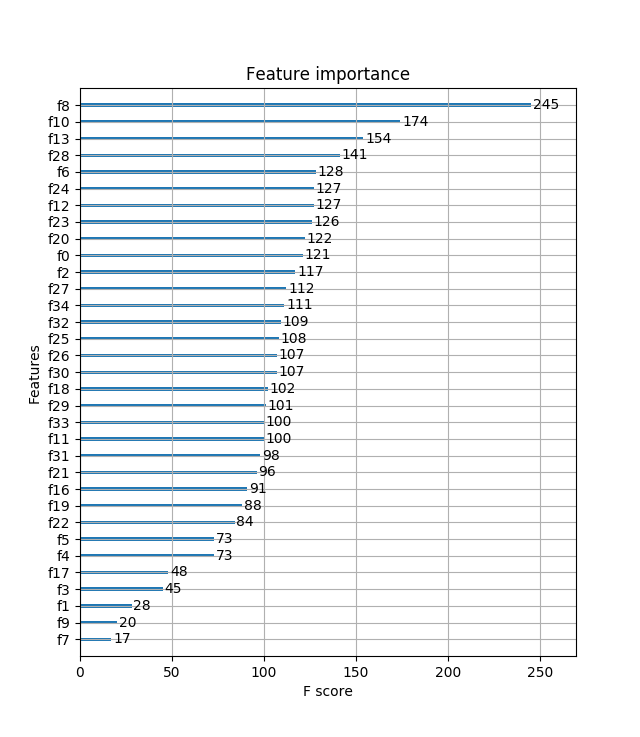
重要特征(值越大,說明該特征越重要)顯示結(jié)果:
5.3 基于Scikit-learn接口的分類
from sklearn.datasets import load_iris
import xgboost as xgb
from xgboost import plot_importance
from matplotlib import pyplot as plt
from sklearn.model_selection import train_test_split
# read in the iris data
iris = load_iris()
X = iris.data
y = iris.target
X_train, X_test, y_train, y_test = train_test_split(X, y, test_size=0.2, random_state=0)
# 訓(xùn)練模型
model = xgb.XGBClassifier(max_depth=5, learning_rate=0.1, n_estimators=160, silent=True, objective='multi:softmax')
model.fit(X_train, y_train)
# 對測試集進(jìn)行預(yù)測
ans = model.predict(X_test)
# 計算準(zhǔn)確率
cnt1 = 0
cnt2 = 0
for i in range(len(y_test)):
? ? if ans[i] == y_test[i]:
? ? ? ? cnt1 += 1
? ? else:
? ? ? ? cnt2 += 1
print("Accuracy: %.2f %% " % (100 * cnt1 / (cnt1 + cnt2)))
# 顯示重要特征
plot_importance(model)
plt.show()
1
2
3
4
5
6
7
8
9
10
11
12
13
14
15
16
17
18
19
20
21
22
23
24
25
26
27
28
29
30
31
32
33
34
35
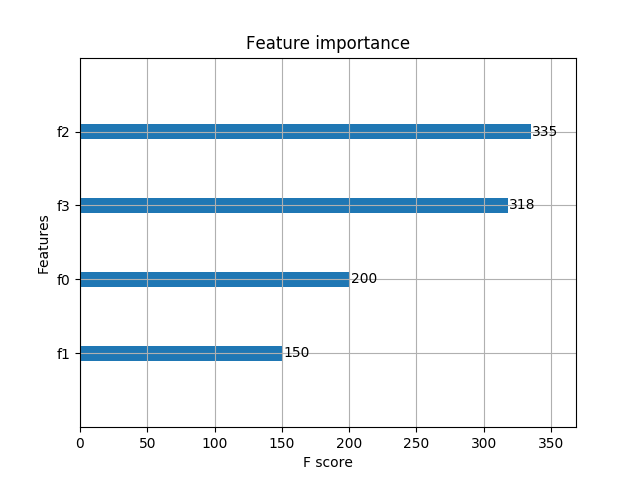
輸出預(yù)測正確率以及特征重要性:
Accuracy: 100.00 %?
1
5.4 基于Scikit-learn接口的回歸
import xgboost as xgb
from xgboost import plot_importance
from matplotlib import pyplot as plt
from sklearn.model_selection import train_test_split
# 讀取文件原始數(shù)據(jù)
data = []
labels = []
labels2 = []
with open("lppz5.csv", encoding='UTF-8') as fileObject:
? ? for line in fileObject:
? ? ? ? line_split = line.split(',')
? ? ? ? data.append(line_split[10:])
? ? ? ? labels.append(line_split[8])
X = []
for row in data:
? ? row = [float(x) for x in row]
? ? X.append(row)
y = [float(x) for x in labels]
# XGBoost訓(xùn)練過程
X_train, X_test, y_train, y_test = train_test_split(X, y, test_size=0.2, random_state=0)
model = xgb.XGBRegressor(max_depth=5, learning_rate=0.1, n_estimators=160, silent=True, objective='reg:gamma')
model.fit(X_train, y_train)
# 對測試集進(jìn)行預(yù)測
ans = model.predict(X_test)
# 顯示重要特征
plot_importance(model)
plt.show()
1
2
3
4
5
6
7
8
9
10
11
12
13
14
15
16
17
18
19
20
21
22
23
24
25
26
27
28
29
30
31
32
33
34
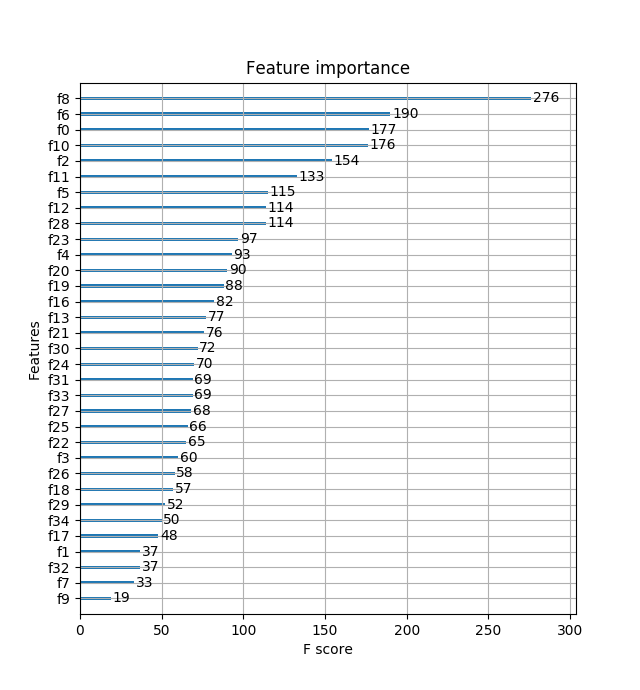
重要特征(值越大,說明該特征越重要)顯示結(jié)果:
未完待續(xù)……
對機(jī)器學(xué)習(xí)和人工智能感興趣,請微信掃碼關(guān)注公眾號!

————————————————
版權(quán)聲明:本文為CSDN博主「JeemyJohn」的原創(chuàng)文章,遵循 CC 4.0 BY-SA 版權(quán)協(xié)議,轉(zhuǎn)載請附上原文出處鏈接及本聲明。
原文鏈接:https://blog.csdn.net/u013709270/article/details/78156207
總結(jié)
以上是生活随笔為你收集整理的史上最详细的XGBoost实战的全部內(nèi)容,希望文章能夠幫你解決所遇到的問題。

- 上一篇: 大门对卧室门用什么方法可以解决
- 下一篇: SVM原理以及Tensorflow 实现